
The Connect Drive plugin simplifies access to your Google Drive files directly on your WordPress website. No coding is required. Easily browse, manage, upload, download, search, embed, and share content from within your site.
This powerful tool allows you and your visitors to view, edit, and delete files effortlessly with a smooth and integrated experience. It eliminates the need for constant logins and provides a seamless way to interact with your Google Drive content quickly and efficiently.
Modules Offered by the Connect Drive Plugin
The Connect Drive plugin provides a variety of modules designed to enhance your website’s functionality. These modules offer a powerful way to manage and display your Google Drive files directly on WordPress.
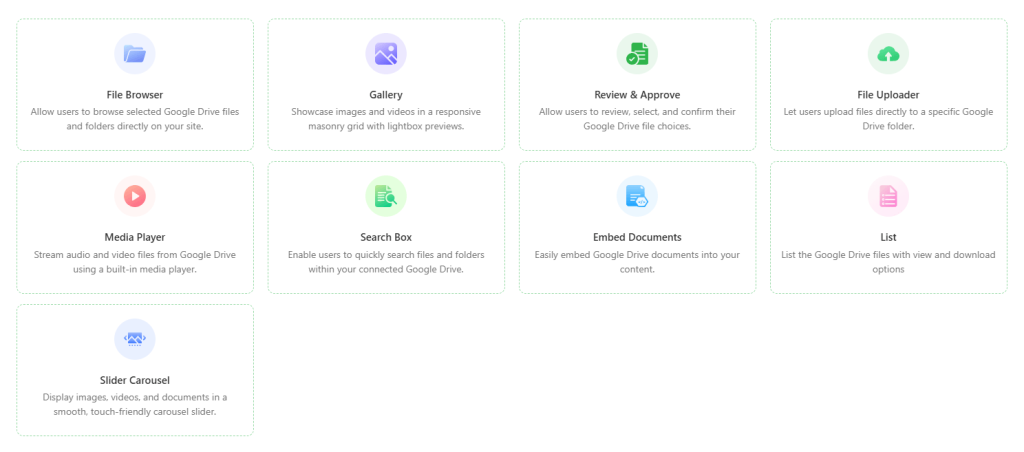
- File Browser: Effortlessly browse and manage your Google Drive files directly from your WordPress site.
- Gallery: Showcase your Google Drive images in a sleek, organized gallery format for a visually appealing experience.
- Review & Approve: Allow users to review, select, and confirm their Google Drive file choices.
- File Uploader: Upload new files to your Google Drive directly from your website, streamlining content management.
- Media Player: Play audio and video files stored in your Google Drive without leaving your WordPress site.
- Search Box: Quickly search through your Google Drive files, making it easy to find exactly what you need.
- Embed Documents: Seamlessly embed Google Drive documents into your website for easy viewing and interaction.
- List: List Google Drive files with View & Download capabilities.
- Slider Carousel: Display your Google Drive images and documents in a dynamic and engaging slider format.
Supports Popular Page Builders
Connect Drive is fully compatible with the most popular page builders. You can easily use it with whichever page builder you are already using.
- Classic Editor: Easily integrate Google Drive content within the classic WordPress editor for a simple, familiar experience.
- Gutenberg: Utilize powerful block-based editing in Gutenberg to embed and manage Google Drive files effortlessly.
- Elementor: Quickly add and display your Google Drive content using the flexible and intuitive Elementor page builder.
- Divi Page Builder: Integrate your Google Drive files seamlessly with the drag-and-drop functionality of Divi.
Popular Forms Integration
The Connect Drive plugin allows you to effortlessly integrate with your favorite form plugins, adding powerful features to your forms and streamlining file management.
- Contact Form 7: Easily attach and store form submissions directly to Google Drive with the Contact Form 7 integration.
- WP Forms: Link WP Forms with Google Drive to save form data and file uploads automatically.
- Gravity Forms: Integrate Gravity Forms with Google Drive to store form submissions and files directly in your Drive.
- Ninja Forms: Use the Ninja Forms integration to upload and manage file attachments from your forms in Google Drive.
- Fluent Forms: Automatically save form entries and attachments to Google Drive with Fluent Forms integration.
- Formidable Forms: Seamlessly store Formidable Forms submissions and uploaded files in Google Drive for easy access.
- Elementor Forms: Integrate Elementor Forms with Google Drive to store form submissions and attachments directly in your Drive.
- Met Form: Capture form entries and uploaded files from MetForm and store them in your Google Drive.